
If vLLM already solved LLM serving, why did SGLang appear?

Updated on
Published on
By

Table of Content
About the author

The NVIDIA H100 is the GPU most Indian enterprises are pricing into their budgets, whether they are training a model or running one in production. The first question is almost always the same: what does it cost per hour? It is a good question to start with. On its own, though, it rarely tells you what you will actually spend.
The hourly rate covers the GPU, and nothing else. Everything around it turns up as its own line on the monthly bill:
These charges vary widely from one provider to the next, and they add up. Two clouds can quote H100 rates that look 40% apart, then send you near-identical bills once everything is counted. On a large general-purpose cloud, the GPU is often the smaller part of the total.
This article works through all of it: what an H100 costs in India across the three ways you can get one, buying it, renting it by the hour, and committing to it for a term. The published Neysa Velocis rate for each, and a simple way to estimate your real monthly total before you pick a provider.
In short
Buy it outright
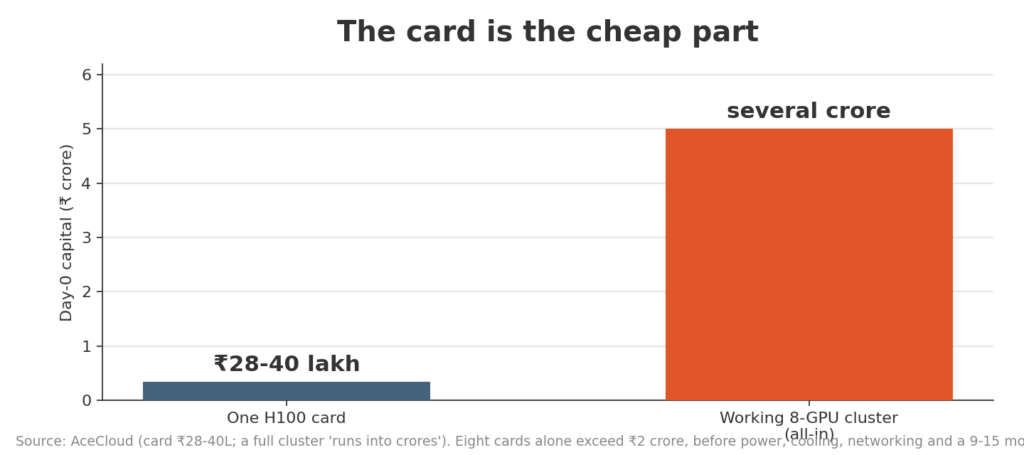
A single H100 runs roughly ₹28 lakh to ₹40 lakh in India, with the SXM variant toward the top of that range, depending on the import route and the seller. Import duty and GST on data-centre GPUs add 20% to 30% on top of the global base, which is most of why the India number sits above the roughly $25,000 to $40,000 the card costs abroad.
The card is the cheap part. Eight of them alone is over ₹2 crore of silicon, and once you add power, cooling, networking and floor space a working cluster runs into several crore before the first training run, on a nine-to-fifteen-month build.
Rent it by the hour
Indian providers list on-demand H100 from around ₹200 to ₹250 an hour, with spot capacity cheaper but far less reliable [spot can be taken away anytime]. Globally the on-demand market now runs from about $1.49 to $6.98 an hour, with specialist GPU clouds sitting near the bottom of that range and AWS, Google and Azure near the top.
Commit to a term
This is where most production workloads land, and where the effective rate drops well below the on-demand sticker. A longer commitment lowers the rate; below roughly 40% sustained utilisation, on-demand usually wins, and above it a commitment does. We put a worked set of committed rates in the closing section.
The single most useful thing to know if you are pricing an H100 in 2026 is that you are shopping in a falling market.
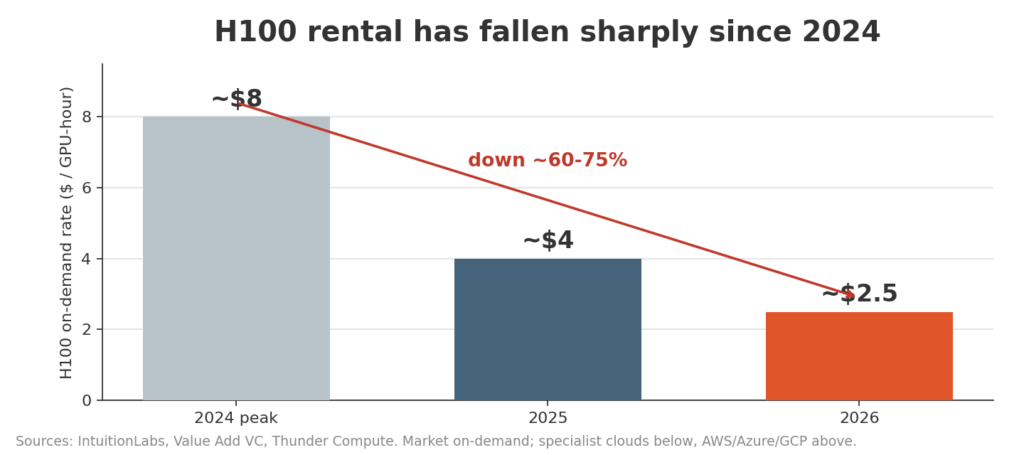
On-demand H100 rates are down roughly 60% to 75% from their 2024 peak, from around $8 an hour then to about $1.80 to $3.50 an hour in mid-2026 (Value Add VC, Thunder Compute). AWS alone cut H100 instance prices up to 45% in mid-2025. The cohort median is now near $2.50 to $3.50 a GPU-hour, against more than $7 in early 2024.
Two forces are behind it.
For a buyer that is good news, with one caveat: a falling rental market is an argument for shorter commitments until you know your steady-state usage.
The hourly rate tells you what one line of the invoice will be. It does not tell you what the invoice will be. A handful of charges outside the compute line usually settle that, and they are where providers diverge most:
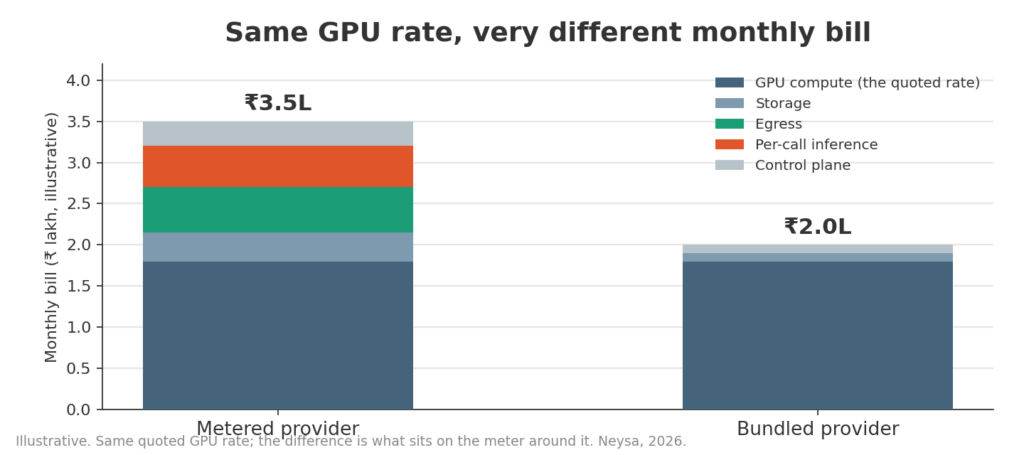
These vary widely from one provider to the next, and they add up. Two clouds can quote H100 rates that look 40% apart, then send near-identical bills once everything is counted, and on the large general-purpose clouds the GPU is often the smaller part of the total. A low hourly rate with everything else on the meter is an airline fare quoted before the seat, the bag and the meal.
So before you commit to anyone, model these five:
The H100 is could be the wrong chip – always start from your use case
Provisioning an H100 where a smaller or different card would do is the most common way teams overspend on GPUs, and it is easier to do in 2026 because the H100 now sits in the middle of a much wider shelf.
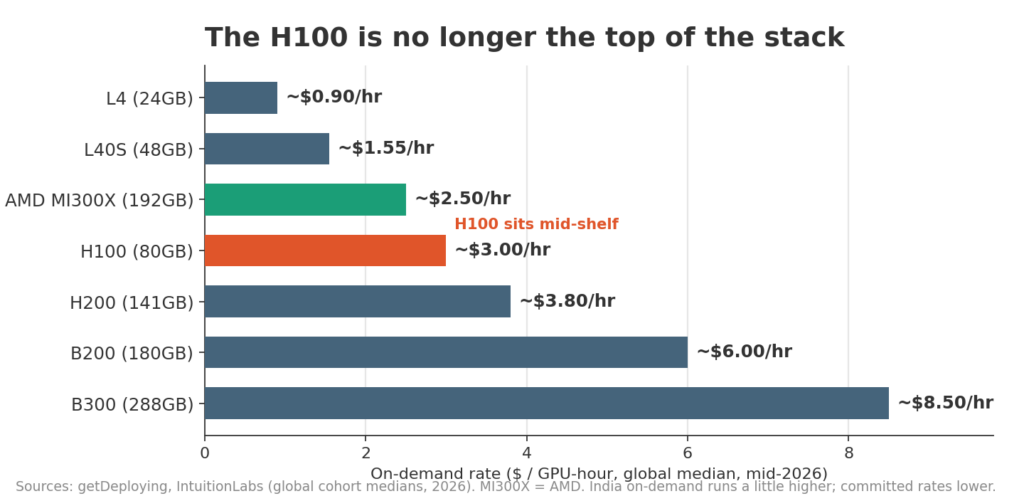
Here is the current on-demand market, cheapest to dearest, with the job each card is built for. Rates are global cohort medians in mid-2026; India on-demand runs a little higher, and a committed rate lands well below any of these.
| GPU | Memory | On-demand median | Best-fit workload |
| L4 | 24GB | ~$0.90 / hr | Real-time inference, small models |
| L40S | 48GB | ~$1.55 / hr | Inference at scale, light fine-tuning |
| AMD MI300X | 192GB | ~$2.50 / hr | Large-model inference, if your stack runs on ROCm |
| H100 | 80GB | ~$3.00 / hr | LLM training, distributed fine-tuning |
| H200 | 141GB | ~$3.80 / hr | Memory-bound large-model inference |
| B200 | 180GB | ~$6.00 / hr | Frontier training and inference |
| B300 | 288GB | ~$8.50 / hr | The largest models, newest silicon |
Two calls are worth making before you default to an H100.
A note on the A100. It still comes up when teams size an H100 budget, but it is previous-generation silicon and the live 2026 question is rarely A100 versus H100 on price. It is whether the job belongs on an L40S, an H100, an H200 or an AMD card.
H100 or H200
If you have decided on Hopper, the H100-versus-H200 choice is mostly about memory. The H200 costs about a quarter more per hour and carries about 75% more memory (141GB against 80GB). When memory capacity is the constraint, a large model you want to hold on one card, the H200 is usually the better economic choice in spite of the higher rate. When throughput is set by inter-GPU bandwidth, as in distributed training, a tightly-coupled 8-GPU H100 node with NVLink is the one to reach for.
Everything above is true of any provider. Here is how it looks on Neysa Velocis, an India-built AI cloud with published rates.
Three ways to run an H100 on Velocis:
Here’s how much an H100 will cost you on Neysa AI Cloud — see the full on-demand H100 pricing page for current rates and configurations.
H100 platform GPU VM (single GPU, NVL 94GB)
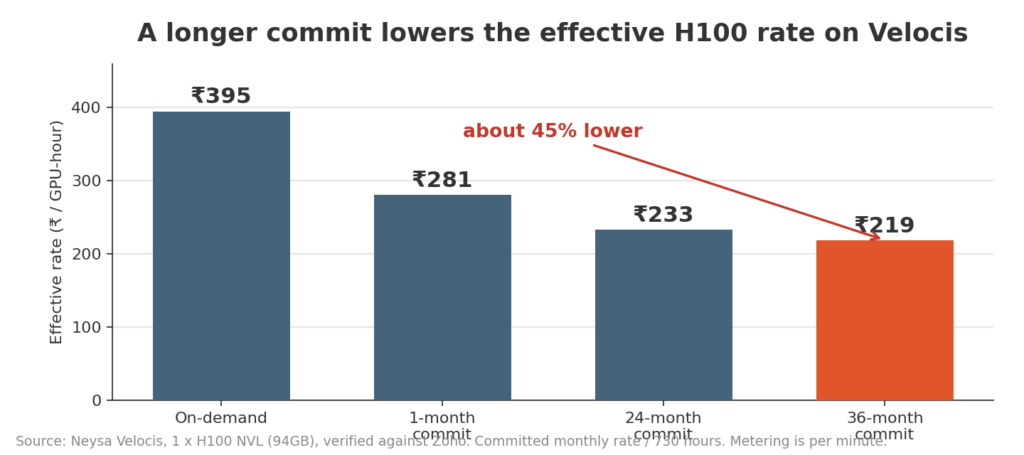
| SKU | On-demand | 1-month commit | 24-month commit | 36-month commit |
| 1 x H100 NVL (94GB) | ₹395 / hour | ₹2,05,000 / month | ₹1,70,270 / month | ₹1,60,054 / month |
H100 bare metal (single-tenant, 8 GPUs, SXM 640GB)
| Configuration | 1-month commit | 24-month commit | 36-month commit |
| 8 x H100 SXM (640GB, NVLink) | ₹14,32,000 / month | ₹11,89,396 / month | ₹11,18,033 / month |
The longer you commit, the lower the effective rate: a 36-month H100 VM works out near ₹219 an hour, about 45% under the on-demand sticker. That is the “predictable pricing with discounts for long-term commitments” trade in numbers.
A few of the charges that inflate a general-purpose bill work differently here, and they are worth naming because they are where the life-of-workload gap opens up:
The metered items are named and predictable, not per-transaction: storage beyond the instance disk is ₹9 per GB per month, a public IP is ₹500, and a Velocis Kubernetes (VKE) cluster carries its control plane as a separate monthly line.
The point is not that Velocis is free. It is that the number you model up front is close to the number you pay.
Neysa Velocis is all built and operated in India, which matters when the workload has data-residency requirements. And the gap between a card’s list price and your bill becomes a Neysa engineer’s job, not something you discover three months in: they size the cluster, set the commitment against your utilisation, and put you on the right card rather than the biggest one.
See predictable GPU cloud pricing for your workload. Talk to an AI Expert about deploying on Neysa Velocis.
High throughput in inference decides whether an AI system feels reliable or fragile at scale. As enterprises move from pilots to production, serving thousands of real-time requests becomes the real challenge that separates strong AI systems from unstable ones.
Inference in machine learning, often misunderstood, is the application of a trained model on new data to generate outputs. It highlights the intersection of training choices and real-world data, ultimately determining a model’s effectiveness and trustworthiness.