
If vLLM already solved LLM serving, why did SGLang appear?

Updated on
Published on
By

Table of Content
About the author

More teams are taking a hard look at AMD chips this year, and the reason is simple: there aren’t enough NVIDIA GPUs to go around. The newest ones are sold out into late-2026, with a backlog in the millions of units, and most of what’s available has already been committed.
You can get AMD chips today, and they’re every bit as capable. A single MI350X carries 288GB of memory, enough to hold a large model on one card, posts strong inference numbers on benchmarks, and serves tokens at a lower cost than most teams are used to paying.
So why isn’t everyone already building on them? Mostly because of rewrite fear, months spent porting code off CUDA, NVIDIA’s software layer – before anything runs.
That fear is outdated, though. For most teams, AI on AMD chips just runs, and for most use cases – the switch is just a toggle instead of a complete rewrite.
The fear assumes your code is full of CUDA. It mostly isn’t. You write your models in PyTorch [the framework nearly all AI is built on], and PyTorch is what talks to the GPU for you. CUDA sits inside PyTorch’s layer, not in the code you wrote. Your models aren’t really tied to NVIDIA, they run wherever PyTorch runs.
And PyTorch runs on AMD, through AMD’s own version of CUDA, called ROCm. Install the AMD build of PyTorch and your code runs unchanged.
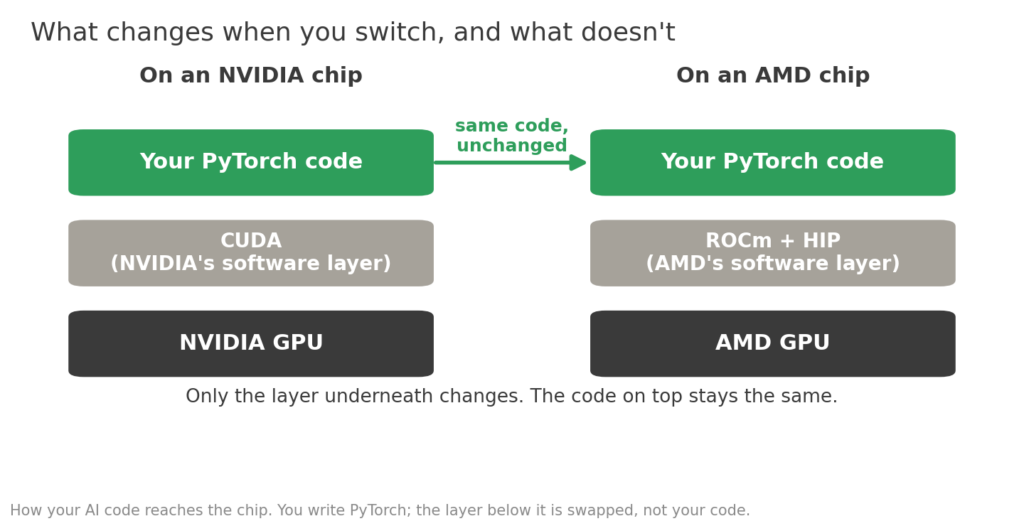
This isn’t a workaround AMD bolted on. PyTorch ships and maintains AMD builds right alongside its NVIDIA ones, updated with each ROCm release.
AMD has a direct equivalent for each NVIDIA tool, so most of the stack maps across without changes. Its porting guide lists them:
| What it does | NVIDIA | AMD equivalent |
| The core way you program the GPU | CUDA | HIP |
| Getting many GPUs to talk to each other | NCCL | RCCL |
| Deep-learning building blocks | cuDNN | MIOpen |
| Core maths libraries | cuBLAS | rocBLAS / hipBLAS |
| Auto-translating old CUDA code | (nothing needed) | HIPIFY |
Same jobs, different names, and installing PyTorch for AMD wires all of it up for you.
A kernel is a code someone writes by hand, to squeeze the last bit of speed out of the GPU, for one specific job. It’s specialist work, usually only teams chasing the last few percent of performance. If your team wrote custom kernels for NVIDIA, those take effort to move.
Everything else, the open-weight models, fine-tuning, standard serving, comes across as-is.
Even a custom kernel isn’t a “from-scratch” rewrite. AMD’s HIPIFY tool converts the routine parts of CUDA to AMD’s HIP automatically, and AMD is upfront that the hand-written parts are where an engineer steps in.
AMD puts a typical port at a few hours to a few weeks, depending on the code.
What moves across, and what doesn’t:
| What you’re running | Moving to AMD Instinct |
| PyTorch training or fine-tuning | Runs. Change the software image. |
| Hugging Face models and libraries | Runs. |
| vLLM or SGLang serving | Runs, with a couple of settings. |
| Standard low-precision formats (FP8, INT4, FP4) | Runs. Supported on the chip. |
| A model pulled from Hugging Face | Runs, usually from day one. |
| Your own hand-written kernel | This is the real work. Plan for engineer time. |
| An NVIDIA-only tool with no AMD version | Check first. This is the real blocker, when it exists. |
The models your team wants to run are already there. The people who build Llama, DeepSeek and the rest, and the teams behind the serving tools vLLM and SGLang, get them running on AMD themselves, usually the day each model ships.
That is day-zero support: a model comes out and runs on AMD the same day it runs on NVIDIA. ROCm 7 has made it routine.
· Llama 4, served in both FP8 and the newer MXFP4 format
· DeepSeek V4, day-0 on SGLang
· Qwen3.6, across MI300X to MI350X
· Gemma 4, the whole family on vLLM and SGLang
· OpenAI’s gpt-oss, day-0 on ROCm 7
· GLM-5.2, which ships with AMD support in its release
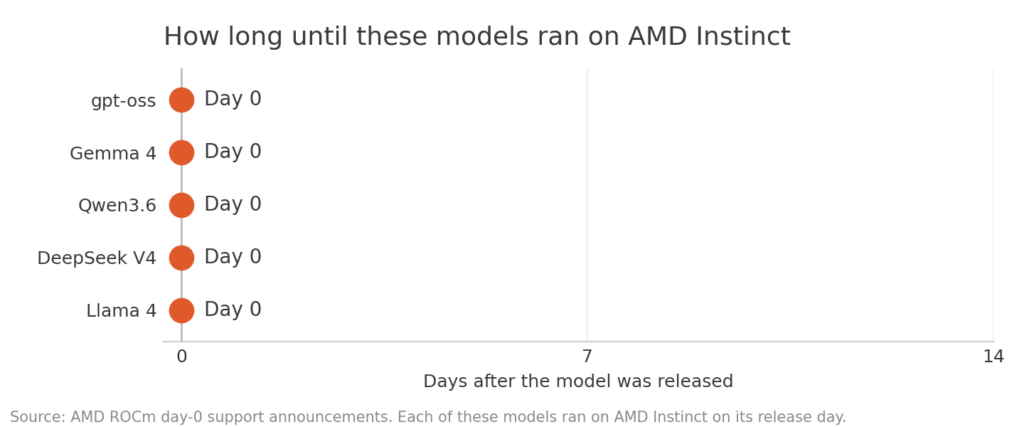
When the models you want are ready on launch day, “will it run” stops being a question.
If AI on AMD works this well, why wasn’t it the obvious choice already? You might ask.
It’s because it only recently became one. A couple of years ago the AMD software was young, and independent testers at SemiAnalysis noted gaps in how models ran on it.
The hardware was strong; the software needed to catch up.
And oh it caught up fast. AMD poured serious engineering into ROCm, and by early 2026 the same testers had seen roughly doubling inference speed on the same chips through software alone – which matched or beat the alternatives on a growing list of workloads.
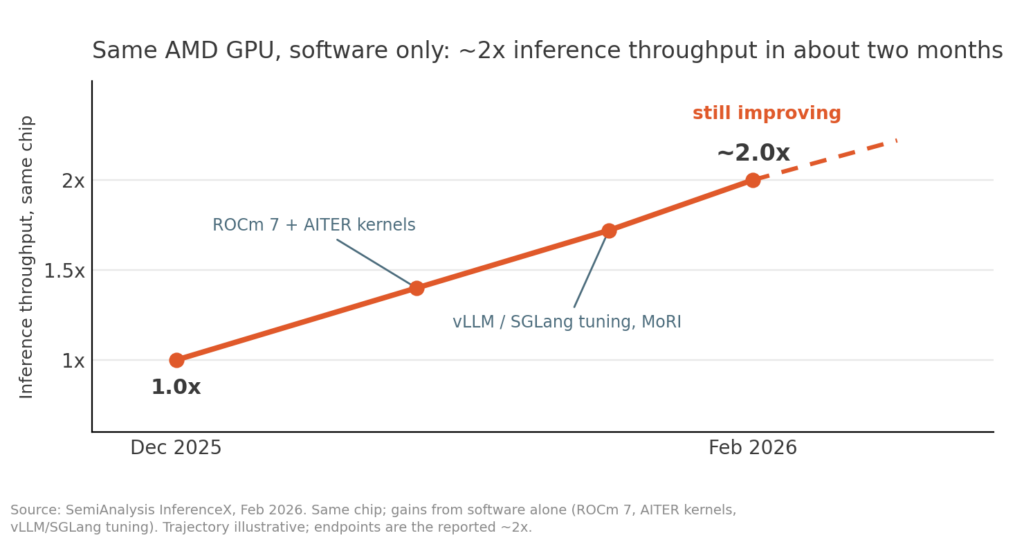
Progress hasn’t stalled, either. AMD is still investing heavily in R&D to push it further.
The gap was software, and AMD closed most of it in about a year.
So don’t judge AMD on last year’s numbers. Run your own MI350x model on the chips and see how it does on your workload today.
Neysa Velocis, our AI cloud, offers AMD chips alongside current NVIDIA’s, so you can run your workload on either, and compare the two.
Velocis is the only SemiAnalysis’s ClusterMAX recommended cloud provider in India – it graded Neysa on what production depends on: reliability, networking, security and operations.
For a team moving to AMD, that means:
The chips are available, your code already runs on them. Talk to a Neysa expert and put your AI on AMD →
Run AI workloads on AMD GPUs with flexible infrastructure built for performance and scale.

This blog deep dives into the increasing costs of AI inference compared to training, with Deloitte forecasting inference to dominate AI compute expenses by 2026. Spotlights three key metrics – time to first token, tokens per second, and queue depth – in evaluating model performance. These metrics help teams optimize user experience and manage costs effectively.